Real-time electricity consumption (first part)
I didn’t tell you what happened to me last summer. Turns out a little before July I changed the oven and the plate. It had ceramic ceramic with many kilometers and it didn’t warm too well, so we’ve changed it to a white-coloured Bosch induction plate that looks beautiful in the kitchen!

Too much electrical consumption
Induction works much better than ceramic ceramic, but also has higher electrical consumption, so in summer, with the air and so on… for every 2×3 I was jumping the automatic for excessive consumption.. My wife very kindly explained to me that she was not too happy with this situation… so We decided to increase the power contracted. And here began a nightmare that lasted almost two weeks.
When I asked Naturgy that I wanted to go from my 3.4kW hired to 4kW, there was some kind of error (they say that for me and I say for yours) and they put me 0.4 kW. I mean, the same power you hire for a garage that has a bulb. The only thing I could have had on was the fridge, but as soon as any other domestic appliances were on, the automatic was leaking.. The best of all was that in the notification that Naturgy sent me there was no information, I was just notified that my power change had been completed… and then he started jumping the automatic without knowing why.
Before I knew that the reason was this, I unplugged some appliances in case they were giving trouble, I disassembled the last switches in case any cable was released that was making short, I went down the different differential phases to try to isolate the problem… and nothing, I kept jumping, so I called an electrician in case the problem was in the same differential.
The electrician was the one who detected the problem, put an amperimetric clamp and found that the one who cut was the supplier’s counter, so from there we already knew that it was a bureaucratic process and that it was not going to be so simple to solve.
In order not to make it too long, I will advance you that It’s been almost two weeks since the automatic started jumping until we had the new power contracted.. With change from Naturgy to Iberdrola market included along the way.
The point is that with the change to Iberdrola after solving this move, I was discharged in the application of the marketer, (https: / / apps.apple.com / en / app / i-de / id1095609253) that allows you to know in real time the consumption of your counter, see historical, we consume peak…


And, as you will have imagined, this generated me. a new need: to know the consumption of my house at all times, both when we are home and there is normal consumption and when we are not that consumption should be residual.
What do we integrate it with?
Unfortunately there is no system site in Apple House or HomeKit where we can integrate this consumption. For a moment I thought about creating a shortcut that would unload consumption every time and let me know. This is clearly not real time… but I really need it to be real time? On the one hand, I’d like to know if I’m going to get over the contracted power and, therefore, it’s going to jump the automatic, but I’m going to be looking at it? Can you send a warning right at that time before you jump?So I decided to integrate it with Home Assistant and have it on the Energy panel there on the main screen.
Plugins and services
A few years ago, the association of electrical companies created a service called Datadis that allows you to know your counter data directly from the CUPS, the identification number of the same, something like the Mac Address of the counter. The first thing to do is to release on this website as it takes a few hours to give you access, In my case, it took almost two days.
Once you have access to Datadis, you will see that there are many plugins in Home Assistant to integrate this data. The one I used is called homeassistant- edata and is available through HACS (Home Assistant Community Store), the alternative site of plugins and integrations that do not yet belong to the official Home Assistant repository. The creator of the plugin is a Spanish named uvevota I have not managed to find on social networks outside of GitHub, so if you listen to the podcast or read the blog or someone
You know him, get in touch with me because I’d like to thank you for your work personally.
The plugin installation is very simple And with that you will have access to the accountant’s history, so you can create any graphics you want. In the same plugin page in GitHub You have some examples.
You know there’s nothing I like more than a graph, so At first I created chorrotocientsthousand graphics that filled my screen with colors, But I have finally stayed alone with 5: Daily consumption, monthly consumption, maximeter with the peaks and the ongoing Month that allows to multiply the kilowatts consumed by the price to have an idea of approximate cost.
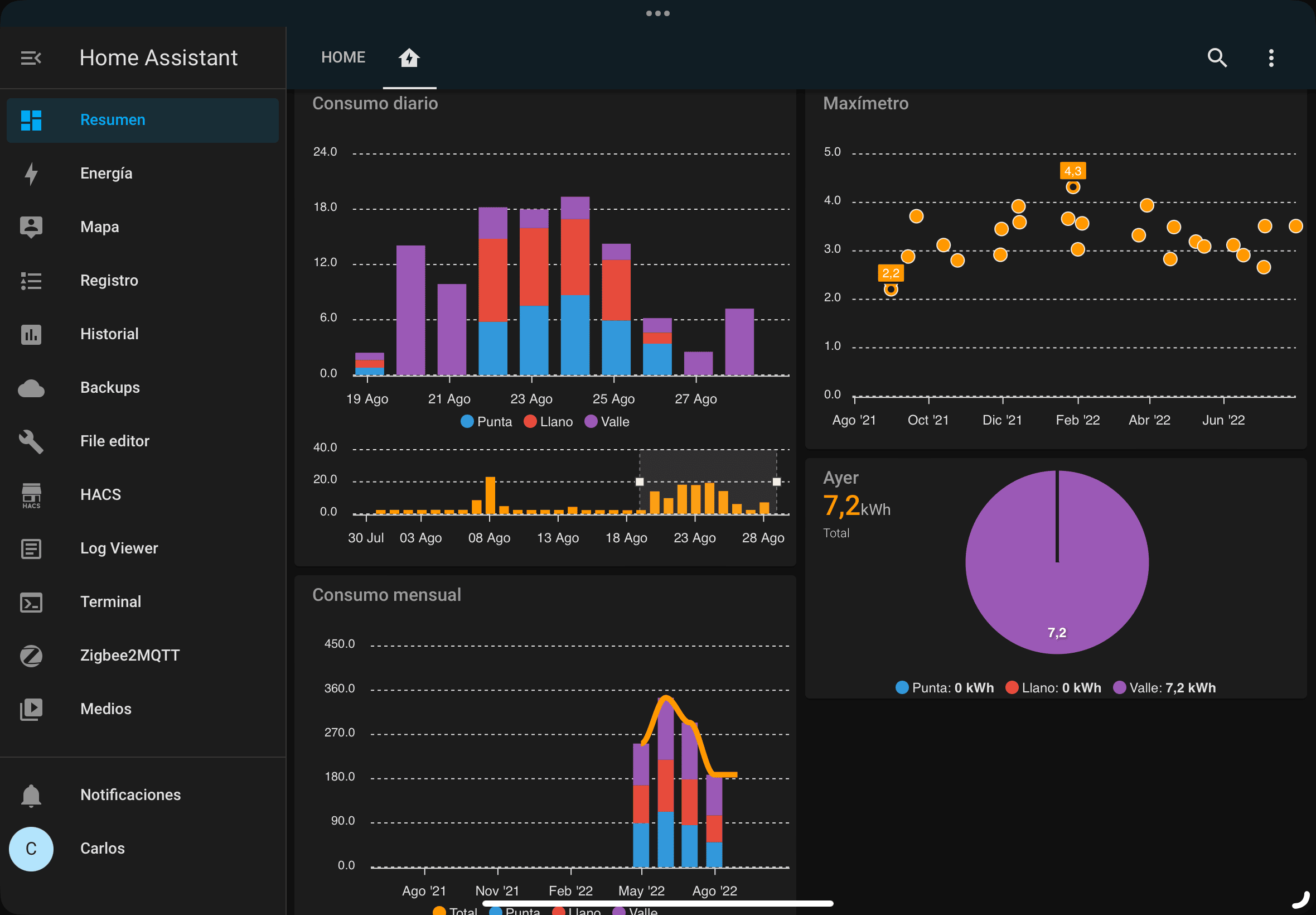
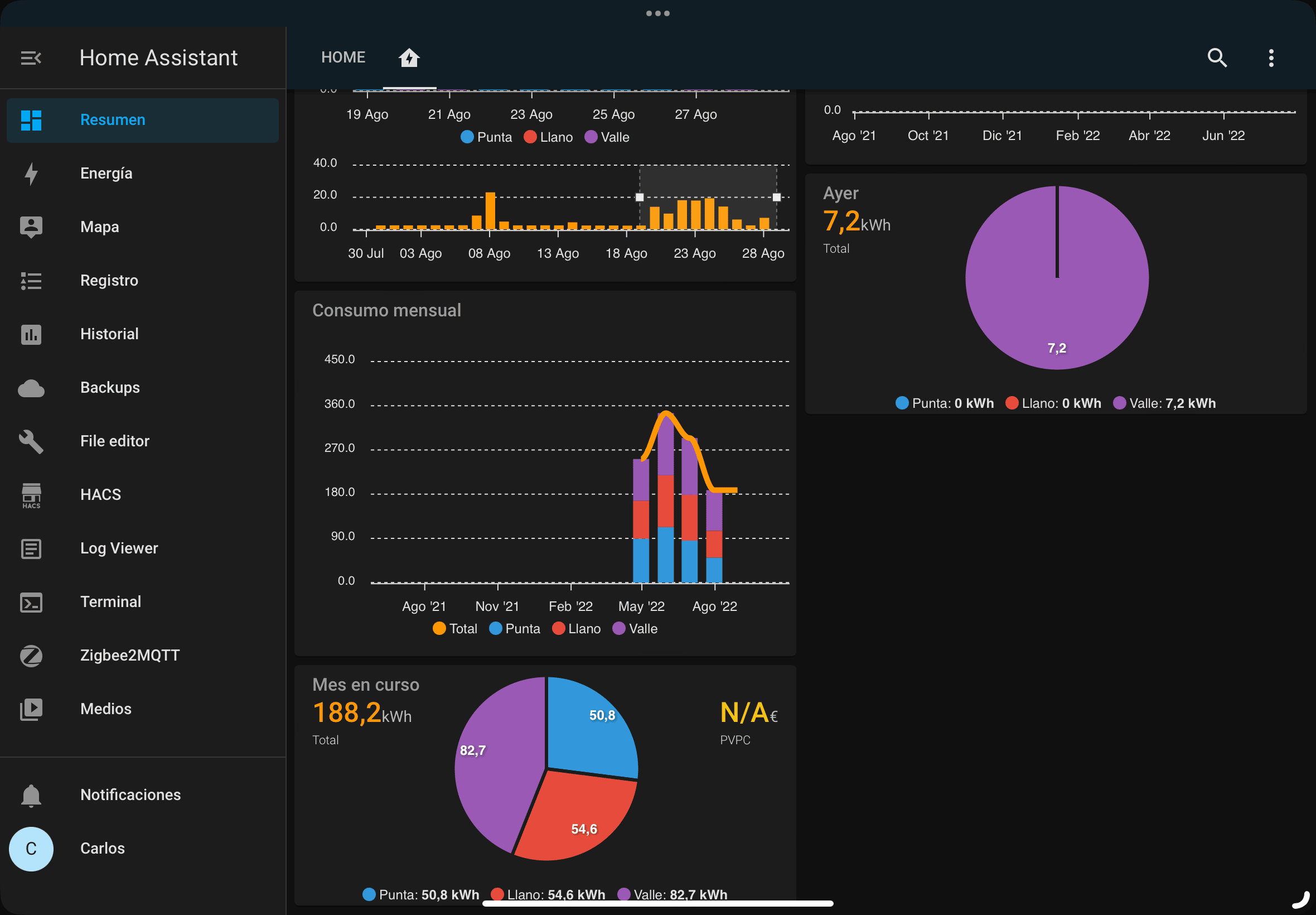
In addition, in the Energy panel also the accumulated data comes out And if you tell him your area, he can even tell you whether the energy you’re using is renewable or not. All very nice, but they are of that kind of graphics you look at once after the thousand and out of curiosity to see if everything is working well (don’t pay much attention to the percentage of renewable energy in the daily graph, I don’t know why it goes wrong)


All right, but…
The truth is, This integration provides a lot of information, but it has a big problem… Datadis doesn’t have your data in real time. Suppliers fly data to Datadis several times a day, but it’s not real time. In fact, sometimes I have found that the graph has been without data for a couple of days because it is not possible to connect with Datadis.
I mean, the solution is fine, it gives us more information than we had before… but does not solve my new need to know the electricity consumption in real time, so I had to look for something more precise… and I found it: Shelly EM with clamp!

I’ll tell you quietly in another entrance, but the Shelly EM has a clamp of 50A that allows to monitor the electrical consumption of the whole house. The clamp is taken to the main exit of the house, the cable through which everything goes to understand us, so consumption cannot be more accurate. In addition, You can use several tweezers to monitor different phases or circuits or even put several Shelly EM.
I can’t tell you much more now because I have the Shelly EM working for a few days but He hasn’t given me time to integrate him into Home Assistant yet., so I see all the data from Shelly’s application, which is not that it goes wrong much less, but I want to integrate it to raise alarms and create the graphics I like so much, so as soon as I have everything well organized and with enough data I will give you more information.
Still, for which you do not want to complicate more, the e-data plugin works perfectly, huh? I haven’t uninstalled it much less, gives me quite valuable information despite not having consumption in real time, so it is a very good solution at cost 0 if you want to know about the consumption you have at home and what are the historical and peak values of consumption.
And if this entry has proved useful to save you some scare and a few euros on the light bill, you could invite me to a cafe;)  wp: block {«ref»: 1612} /